EVERTONE COMPRESSOR
User Manual - F=ma Physics Engine Compressor
1. Introduction
EVERTONE COMPRESSOR is an innovative compressor that applies the physical law F=ma (Force = Mass × Acceleration) to audio processing. It stands apart from conventional digital processing by achieving natural dynamics control through motion equations.
2. Physics Engine Features
The plugin's key feature is its physics calculation engine based on the F=ma motion equation. By treating audio signals as mass and applying acceleration components to electrical energy conversion, it produces unprecedented natural and musical compression and recovery effects.
Technical Innovation
When recording sound with a microphone, the recorded signal captures transients with diminished or lost acceleration that should naturally be present. Signals lacking acceleration cannot adequately drive speakers, resulting in flat soundscapes, peak frequency generation, and masking phenomena.
Our EVERTONE EXPANDER product enables natural restoration of transient acceleration that should exist in recordings, dramatically improving peak and masking issues in sound processing and facilitating three-dimensional transient separation.
EVERTONE COMPRESSOR features the same physics calculation engine as EVERTONE EXPANDER.
It overturns the conventional notion that compressors are merely tools for leveling volume, achieving natural and musical dynamics and envelope control.
3. Physics Modes (4 Modes)
Four physics modes are available, each with different acceleration characteristics:
Standard
Traditional standard compression and recovery
F=ma Light
Subtle and gentle expansion with low acceleration
F=ma Medium
Balanced, versatile setting with medium acceleration
F=ma Heavy
Powerful and dynamic expansion with high acceleration
4. Main Parameters
Basic Controls
THRESHOLD
Sets the volume level where compression begins. Compression effect is applied to signals exceeding this value.
RATIO
Determines expansion strength. Higher values increase reduction amount and extend peak level retention time.
Timing Controls
ATTACK
Controls response speed when signal exceeds threshold. Short values react instantly, while longer values operate gradually.
RELEASE
Sets return time when signal exceeds threshold. Important parameter for controlling musical sustain.
HOLD
Peak hold function. Maintains peak level for a set time to achieve musical dynamics changes. Set slider to minimum (0) to enable Hold Bypass.
Shape Controls
KNEE
Adjusts smoothness of operation around threshold. Lower values create hard knee, higher values create soft knee.
RANGE
Limits maximum compression range. Prevents extreme compression and ensures practical operation range.
F=ma Physics Control Mode
This unique plugin mode focuses on "actively designing sound swells and envelope curves like reflections and reverberations" through highly natural compression and recovery operation conforming to physical laws.
Recommended settings: FORCE 1.00, DAMPING 1, HOLD 0 for pure physics law settings.
FORCE
Controls "force" strength in physics calculation, enabling active addition of acceleration concepts in dynamics processing.
- Low values (0.1-2.0): Delicate and natural operation
- Medium values (2.0-10.0): Active slam
- High values (10.0-100.0): Powerful to ultra-powerful slam
DAMPING
Controls physical system damping characteristics. At 1, normal recovery; at 10000, recovery exceeding the starting point like a high-rebound rubber ball thrown onto a hard floor. This extreme range enables special dynamics effects previously impossible, with an operational feel like slamming a ball onto the floor.
5. BPM Sync System
ASSIST Function
NORMAL/ADVANCED
You can choose from two types of recommended effective parameter values for BPM: NORMAL or ADVANCED. When you select either one, the ATTACK, HOLD, and RELEASE parameter values will be set to the recommended values for NORMAL (blue) or ADVANCED (red) settings. This function makes your workflow dramatically more effective and musical.
NOTE GRID Function
EVERTONE COMPRESSOR recognizes the DAW's BPM within the plugin even when BPM SYNC is off, displaying BPM in the upper right. The NOTE GRID function changes ATTACK, HOLD, and RELEASE sliders to step-based control following note grids.
Dotted note grid units
Triplet note grid units
Intuitive timing control
TILT Control
TILT
Unified control of three timing parameters: ATTACK, HOLD, and RELEASE. Adjustable at ±100% ratio against adjacent reference note grids.
6. Waveform Display and Meters
Real-time Waveform Display
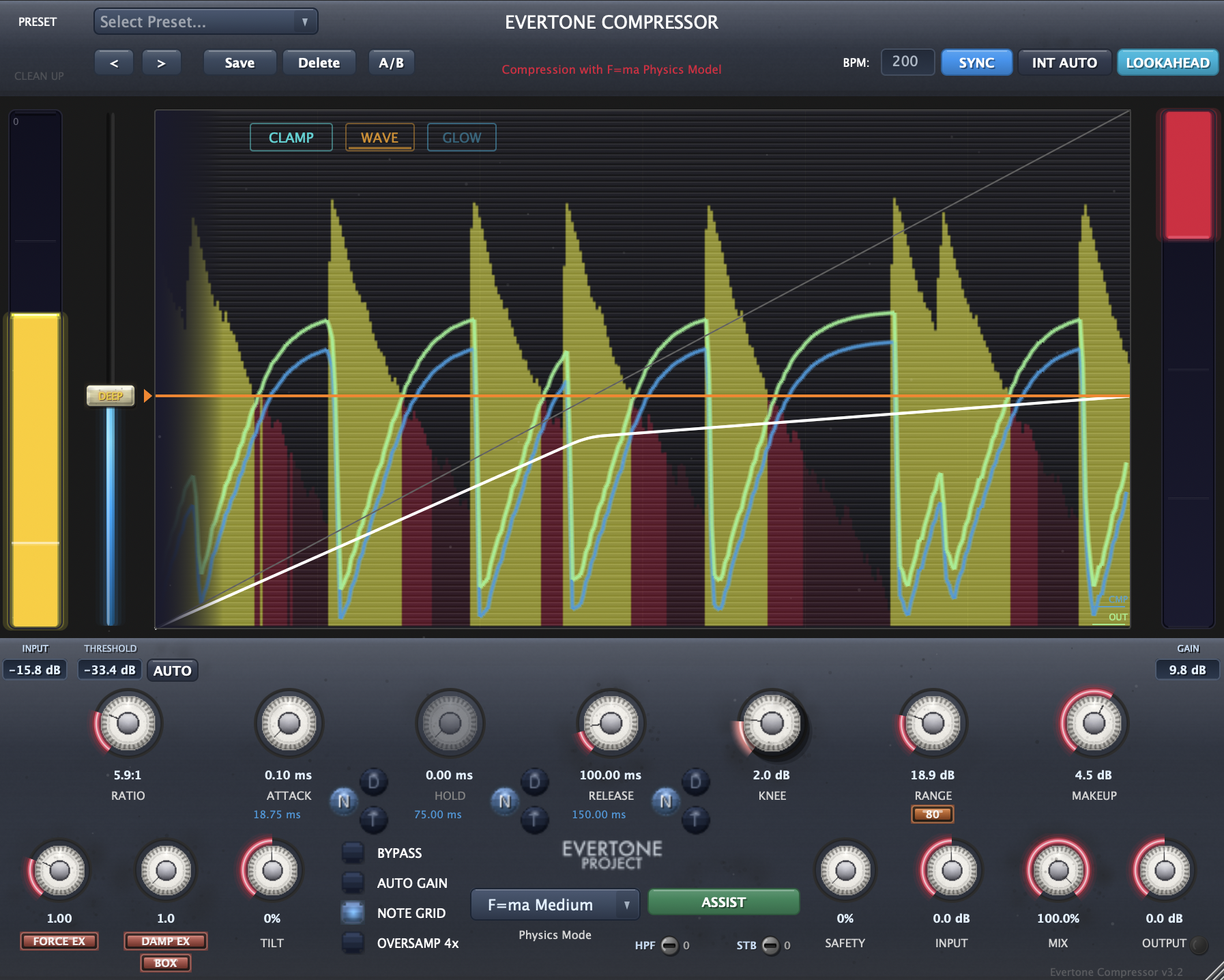
The waveform display screen centered in EVERTONE COMPRESSOR allows visual confirmation of input signals in real-time. This waveform display is not just a viewing function but an important tool for intuitively understanding compression processing effects and envelope curves.
Actual audio signal displayed in yellow
Result after compression effect
Immediate reflection of dynamic changes during playback
Visual confirmation of expansion effect strength
Output Curve Visualization: Displays the actual output curve with a green line, providing visual feedback of the processed signal.
CLAMP/FREE: Visually clamps each curve so it doesn't overflow from the bottom of the waveform display window. In FREE mode, waveforms may be drawn outside the window. Select according to your waveform visibility needs.
DRY/WET Output Curve and Effect Curve: Features an output curve that graphically shows the waveform state according to the MIX value. Transient and envelope curves can be viewed at MIX 0% and MIX 100%. Each curve's visual display can be toggled on/off from the bottom right of the waveform display window.
DEEP Alert: When THRESHOLD exceeds -30dB, the slider knob changes to display the word "DEEP" with a yellow gradation corresponding to the depth, and when it exceeds -45dB, the knob and slider turn red to notify you. Especially with expanders, when the effect is too deep, it creates a fade-in feeling, so recognize when the THRESHOLD is too deep and adjust by mixing in the DRY signal or loosening the THRESHOLD.
Operation Tips
Click the waveform display screen to pause the waveform and observe the curves. You can also observe DRY/WET comparison and gradual changes with the MIX knob.
Use this for reliable monitoring and verification of transient and envelope design.
Meter Functions
Input Meter (Left)
- INPUT Display: Real-time display of current input level
- Level Value: Numerical display in decibels (dB)
- Peak Hold: Holds and displays momentary peak values (click number box to toggle)
- Level Verification: Understanding relationship with THRESHOLD parameter
Gain Meter (Right)
- GAIN Display: Decibel display of real-time gain changes
- Reduction/Recovery Visualization: Gain reduction amount as a compressor
- Dynamic Display: Instant display of gain changes according to audio signal
- Effect Verification: Visual confirmation of compression and recovery effect strength from parameter settings
7. Safety Features and Controls
Gain and Mix Controls
INPUT/OUTPUT/MAKEUP GAIN
Level adjustment possible at each stage of signal flow.
The output knob changes color to indicate clipping.
AUTO GAIN
Automatically analyzes input and output levels and assists in appropriate level correction. Operates for approximately 5 seconds to adjust WETTRIM to the optimal value.
This plugin actively designs dynamics, so correction is kept to a minimum.
MIX
Adjusts ratio of dry and wet signals, assisting adjustment to desired results from active design to reinforcement range.
Additional Functions
OVERSAMPLING
X4 oversampling reduces aliasing distortion.
Safety
Prevents fade-out effects and clipping from sudden gain changes. Automatically detects gain changes and suppresses unnatural volume changes. Set to 0 to disable.
BYPASS
Instantly disables entire effect.
8. New Features v2.9.9SE
Version 2.9.9SE introduces five new features for more intuitive and creative sound design.
BOX / AIR Release Mode Select
Choose between two release behavior modes for the compressor.
- BOX: Mechanical and tight release character
- AIR: Open and airy release character
Switch between modes depending on your goal - tight kick drums or open snares.
EXTREME Switch
Extends the FORCE and DAMPING parameters while enabling more dramatic and effective approaches in EXTREME mode.
- FORCE extends up to 200
- DAMPING extends up to 20000
Achieve more intuitive aggressive slam, pull-back, or bounce effects!
EXTREME RANGE
A toggle button has been added below RANGE to switch between normal 40 mode and EXTREME 80 mode.
Expand the reduction RANGE up to 80dB.
HPF: Sidechain High-Pass Filter
A sidechain high-pass filter supporting up to 300Hz.
Avoid triggering from strong low-frequency energy while keeping the compressor working at the intended timing. Prevents unwanted retriggering when setting deep thresholds.
STB: Stability Control
With the addition of EXTREME settings, it's easy to get carried away with destructive sound design. However, correcting good momentum with fine parameter adjustments is inefficient and uncreative.
Use the Stability Control to manage wild behavior with a single knob that controls multiple parameters while maintaining stability. Supports stable control in the 0-100 range.
9. V3.0 New Features
V3.0 introduces a redesigned UI and new features.
New UI Design
The UI design has been refreshed with a realistic well-used UI mode.
Areas that are frequently touched appear worn, providing hints for operating the product.
You can wipe away the wear and restore to a new condition using the CLEAN UP button at the top left of the header.
When in the clean UI state, it displays WELL-USED, and clicking this switches to the worn UI.
GLOW Button
A GLOW button has been added to the waveform display window.
While the waveform display window design has been refined, pressing the GLOW button brightens the back panel.
10. V3.1 New Features
V3.1 adds more advanced automatic adjustment features and KNEE control guide functionality.
AUTO THRESHOLD
Auto threshold function.
Automatically adjusts THRESHOLD so that the gain change amount approaches the value set in RANGE.
After adjustment is complete, AUTOGAIN adjustment is processed as part of the same workflow.
INTELLIGENCE AUTO
Automatically adjusts THRESHOLD so that the gain change amount approaches the value set in RANGE, while also automatically adjusting RATIO as needed.
After adjustment is complete, AUTOGAIN adjustment is processed as part of the same workflow.
KNEE Glow Light
Double-click the center of the KNEE knob to pop up the KNEE knob as a push-pull knob.
When parameter settings enter the optimal range by design, an arc light illuminates to indicate that KNEE can be effectively controlled.
Double-click the center of the knob again to return to normal display.
KNEE Control Guide
Counter-clockwise (lower value): Hard knee - compression applies immediately when the signal exceeds the threshold.
Clockwise (higher value): Soft knee - compression starts smoothly, providing a natural decay feel.
By operating in the appropriate state, you can freely control the stickiness and energy feel of any material including bass drum, snare, bass, vocals, percussion, piano, and guitar.
11. V3.2 New Features
V3.2 adds lookahead functionality, enabling both natural processing and hard approaches.
LOOKAHEAD
Lookahead function for more natural processing.
When LOOKAHEAD is on, latency occurs. When off, it operates at zero latency.
Even with hard settings, you can now differentiate between rock-oriented processing approaches and modern, natural approaches for different sound characters!
12. V3.3 New Features
V3.3 introduces reduced screen rendering load and ECO display mode.
Reduced Screen Rendering Load & ECO Mode
In addition to the overall rendering load reduction, ECO mode further reduces the waveform display rendering load.
Use according to your environment and the number of simultaneous display windows.
13. V3.3.2 New Features
V3.3.2 includes the following improvements.
KNEE GLOW Enabled by Default
KNEE GLOW is now enabled by default.
New Preset: "EX TRIGGER BLEND ADV"
A new preset that blends in trigger-like aggressive behavior, designed for kick, snare, bass, and more. By lowering the blend ratio, it can also be used on bus and master channels.
Improved Windows Compatibility
Enhanced compatibility measures for Windows environments.
14. V3.3.4 Fixes
V3.3.4 includes the following fix.
Fixed bus selection in FL STUDIO
Fixed an issue so that the stereo bus is selected by priority in FL STUDIO.
15. EVERTONE PROJECT
EVERTONE EXPANDER and EVERTONE COMPRESSOR bring true freedom to all musicians and engineers.
Additionally, EVERTONE PICKUP realizes the dream technology of maintaining acceleration during mutual conversion between kinetic and electrical energy for electric guitar and bass pickups.
Frequency-based conventions are rapidly shifting to energy-based conventions that are the source of frequency generation.
We look forward to your continued support of EVERTONE PROJECT products.