1. Introduction
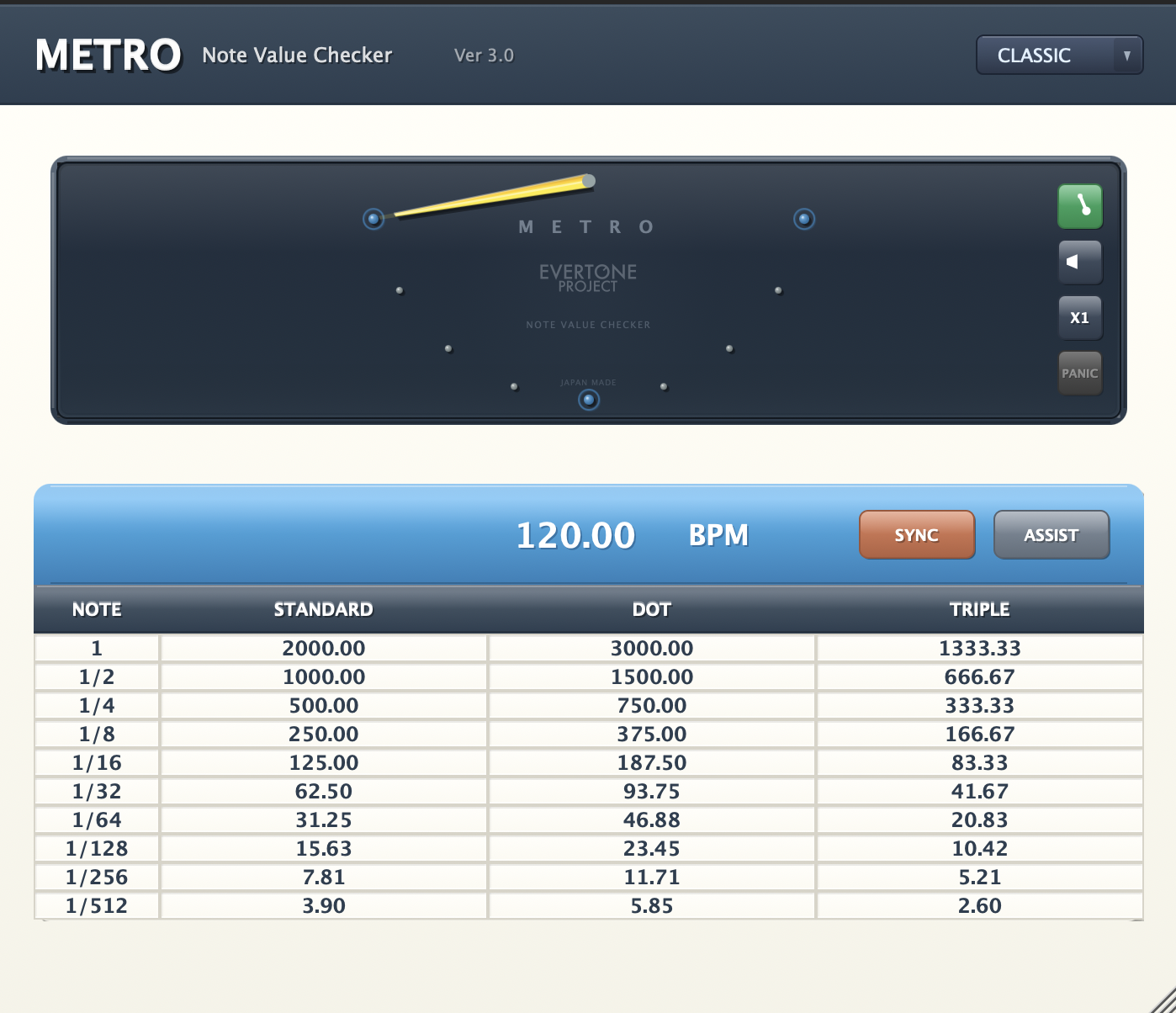
METRO PLUGIN is a plugin that calculates optimal parameter values for effects such as expanders and compressors used in mixing and mastering.
In modern mixing, it is not uncommon to optimize dynamics processing on a musical note basis by reflecting note duration values derived from the track's BPM into effect parameters.
By processing based on musical notes, each track behaves like an advanced version of sidechain compression, and very logical behavior can be observed when examining output waveforms with an oscilloscope.
As a result, this musical approach makes mixing and mastering more accessible than intuition-based work alone, ultimately enabling the creation of signals that properly drive speakers and headphones.
Sound engineering is entering a new dawn.
2. Basic Functions
Main Features
BPM Input Window
Allows BPM input. In SYNC mode, input is disabled and the session BPM is displayed.
SYNC Button
Retrieves session BPM information and automatically synchronizes to the session BPM.
Visual Meter Button
Toggles the visual note value meter on/off.
Pulse Signal Button
Toggles pulse signal playback/stop.
Speed Control Button
Instantly switches pendulum and pulse speed between ×0.5, ×1, and ×2.
Panic Mode Button
Toggles the panic mode function on/off (described later).
COPY Button
Toggles automatic clipboard copying when clicking table values.
ASSIST Button
Displays the ASSIST table (described later).
UI Design Select
Switches between CLASSIC and LUXURY designs.
The visual meter and ASSIST functions are the product's most distinctive features, so please make effective use of them.
3. Visual Note Value Meter
A pendulum-type meter that swings left and right, allowing visual confirmation of note values.
Basically, the full swing length represents a quarter note, with dot marks positioned at eighth, sixteenth, and thirty-second note positions.
Engineers can logically confirm which note values they are seeking for attack, hold, release, etc. in expanders and compressors used on kick drums and snares, using both auditory and visual senses.
Of course, even demanding clients can see at a glance, leading to more efficient communication.
Meter Display Features
- Quarter Note: Full swing length
- Eighth, Sixteenth, Thirty-Second: Positions marked with dots
- Visual Confirmation: Note values can be confirmed both aurally and visually
- Communication Efficiency: Easy-to-understand display for clients
4. ASSIST Function
Displays recommended values calculated from BPM for sound engineers to select which values from this calculation table to use for expanders and compressors.
ASSIST Function Types
UPWARD EXPANDER
Displays recommended values for expanders.
COMPRESSOR
Displays recommended values for compressors.
GLUE COMPRESSOR
Displays recommended values for bus compressors, master compressors, etc.
Setting Modes
NORMAL
Displays general values for effects without DRY/WET functionality.
ADVANCED
Displays values for cases where envelope curves are formed more aggressively, assuming DRY/WET parallel processing.
5. Copy Function
Copies numerical values to the OS clipboard when clicking on the table.
Parameters can be quickly updated by pasting into the parameter input window of the target plugin after clicking.
Usage
- Click on a value in the table
- Automatically copied to clipboard
- Paste into plugin parameter input window
- Quickly update parameters
6. Panic Mode
The pendulum and pulse signal operate at the timing of the STANDARD column in the tapped table.
While this is a bonus mode, it may broaden your perspective on the playback flow and limits of human perception, especially regarding short notes.
Features
- Expanded Perspective: Experience cognitive limits of short notes
- Learning Tool: Deepen understanding of human cognitive flow
- Experimental Function: Provides new perspectives on note value recognition
7. Important Notes
Using with Pro Tools
When using with Pro Tools, please use one of the following methods to obtain correct tempo information:
- Insert the click2 plugin in a slot before METRO
- Insert METRO on an audio track that has click audio in the region
Track Type Requirements
This plugin does not support mono tracks in Logic in order to obtain accurate tempo data.
Please use on stereo tracks.
8. EVERTONE PROJECT
METRO PLUGIN, EVERTONE EXPANDER, and EVERTONE COMPRESSOR bring true freedom to all musicians and engineers.
Additionally, EVERTONE PICKUP is a pickup for electric guitar and bass that realizes the dream technology of preserving acceleration during mutual conversion between kinetic energy and electrical energy.
Common knowledge based on frequency is rapidly changing to common knowledge based on energy, which is the source of frequency generation.
We look forward to your continued support of EVERTONE PROJECT products.
EVERTONE Product Lineup
- METRO PLUGIN: Note Value Calculator + Optimal Settings Recommendation
- EVERTONE EXPANDER: Expander Plugin
- EVERTONE COMPRESSOR: Compressor Plugin
- EVERTONE PICKUP: Electric Guitar/Bass Pickup